

How UX Design Improves Conversions for Better Customer Engagement
Introduction
Understanding how UX design improves conversions is essential for any business that wants to turn website visitors into customers. While attracting traffic through SEO, advertising, or social media is important, those efforts can be wasted if visitors struggle to navigate your website or complete desired actions.
User experience (UX) design focuses on creating websites and digital experiences that are easy, intuitive, and enjoyable to use. When users can quickly find information, trust what they see, and complete tasks without frustration, they are more likely to engage with your business and take action.
Whether the goal is generating enquiries, securing bookings, increasing online sales, or growing newsletter subscriptions, good UX design directly influences conversion rates. It helps remove obstacles, guides users through the customer journey, and creates positive interactions that encourage engagement.
In this guide, we’ll explore how UX design improves conversions, why it matters for businesses of all sizes, and practical ways to optimise user experiences for better customer engagement and stronger business outcomes.
What Is UX Design and Why Does It Influence Conversions?
UX design is the process of creating digital experiences that are efficient, accessible, and user-friendly. Its primary goal is to help users accomplish their objectives with minimal effort and frustration.
Understanding UX Design
User experience encompasses every interaction a visitor has with a website, app, or digital platform. It includes navigation, page layout, content structure, loading speed, accessibility, and overall usability.
Many people confuse UX with user interface (UI) design. While UI focuses on visual elements such as colours, buttons, and typography, UX focuses on how users interact with those elements and whether they can complete tasks successfully.
What Are Conversions?
A conversion occurs when a visitor completes a desired action. Examples include:
- Purchasing a product
- Submitting a contact form
- Requesting a quote
- Booking a consultation
- Signing up for a newsletter
- Downloading a resource
Every business defines conversions differently, but the goal remains the same: turning visitors into engaged prospects or customers.
The Relationship Between UX and Conversion Rates
Good UX design reduces barriers that prevent users from taking action. When a website is intuitive and trustworthy, visitors can focus on their goals instead of figuring out how the website works.
This is precisely how UX design improves conversions—it removes friction and creates confidence throughout the customer journey.
When businesses understand how UX design improves conversions, they can prioritise changes that directly influence customer behaviour and decision-making.
The Business Impact of How UX Design Improves Conversions
Good UX design directly contributes to measurable business outcomes. It affects not only conversions but also customer satisfaction, retention, and brand perception.
Why User Experience Matters More Than Ever
Modern consumers have high expectations. If a website feels slow, confusing, or outdated, visitors often leave within seconds.
With mobile browsing now accounting for a significant portion of web traffic, businesses must ensure their digital experiences meet users’ expectations across all devices.
Key Benefits for Businesses
Strong UX design can deliver several advantages:
- Higher conversion rates
- Improved customer engagement
- Lower bounce rates
- Increased lead generation
- Better customer retention
- Enhanced brand credibility
Industry experience consistently shows that businesses often focus heavily on acquiring traffic while overlooking usability issues that prevent conversions.
UX Metrics That Influence Business Performance
| UX Factor | Impact on Users | Potential Business Outcome |
|---|---|---|
| Fast page speed | Less frustration | Higher conversions |
| Clear navigation | Easier browsing | More enquiries |
| Mobile usability | Better accessibility | Increased engagement |
| Simple forms | Reduced effort | More leads |
| Consistent design | Greater trust | Higher sales |
Key takeaway:
- Better usability creates smoother customer journeys.
- Reduced friction increases completion rates.
- Trust-building elements improve customer confidence.
How UX Design Improves Conversions Across the Customer Journey
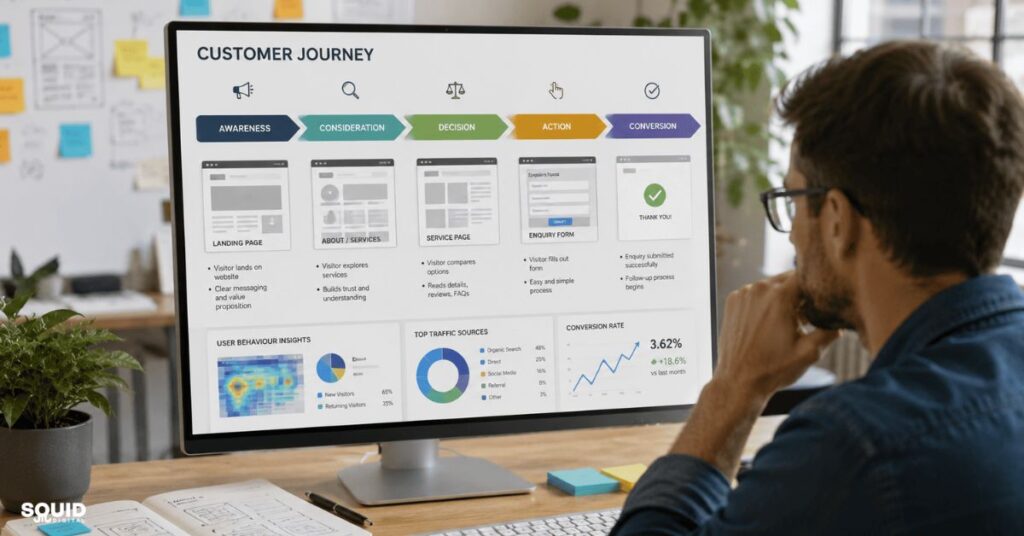
A key reason how UX design improves conversions has become an important business topic is that UX influences every stage of the customer journey.
First Impressions and Trust Building
Visitors often form opinions about a website within seconds. A professional design, clear messaging, and organised layout immediately establish credibility.
Trust signals such as customer reviews, testimonials, certifications, and secure payment indicators can significantly influence purchasing decisions.
Helping Users Find What They Need Faster
Users should never have to guess where information is located.
Effective UX design improves:
- Navigation structure
- Search functionality
- Content organisation
- Internal linking
When visitors can easily find relevant information, they are more likely to stay engaged and continue exploring.
Reducing Friction During Decision-Making
Every unnecessary step creates an opportunity for users to leave.
Examples of friction include:
- Complex forms
- Hidden pricing information
- Slow-loading pages
- Confusing navigation
Removing these obstacles makes decision-making easier and increases the likelihood of conversion.
Creating Confidence at Key Conversion Points
Conversion pages should provide reassurance.
Examples include:
- Customer testimonials
- Case studies
- Trust badges
- Guarantees
- Clear policies
When uncertainty decreases, conversion rates often increase.
A Practical Framework for Improving UX and Increasing Conversions

Businesses looking to improve performance should follow a structured optimisation process.
Understanding how UX design improves conversions is only the first step. Businesses must also apply proven optimisation techniques to achieve measurable results.
The 5-Step UX Conversion Improvement Process
- Identify key conversion goalsDetermine which actions matter most, such as enquiries, bookings, or sales.
- Analyse user behaviour and website dataReview analytics, heatmaps, and user recordings to understand visitor behaviour.
- Find friction points and usability issuesIdentify pages where users drop off or abandon tasks.
- Implement UX improvementsPrioritise changes that directly impact conversion paths.
- Measure results and optimise continuouslyMonitor performance and refine improvements based on data.
Questions to Ask During a UX Review
- Can visitors immediately understand what we offer?
- Is navigation intuitive?
- Are calls-to-action easy to locate?
- Does the website work well on mobile devices?
- Is completing a form simple and straightforward?
Quick UX Wins Small Businesses Can Implement Today
- Reduce unnecessary form fields
- Improve page loading speed
- Simplify navigation menus
- Strengthen call-to-action wording
- Improve mobile responsiveness
- Use clearer page headings
Quick recap:
- Start with data, not assumptions.
- Prioritise high-impact improvements.
- Continuously test and optimise.
Common UX Mistakes That Reduce Conversion Rates
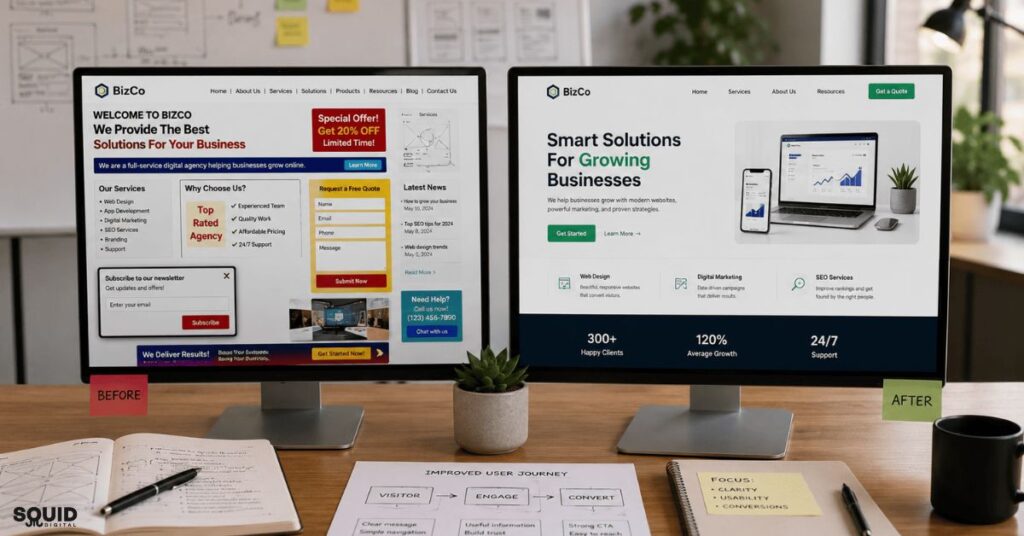
Even attractive websites can struggle to convert if usability issues exist.
Businesses often fail to experience the full benefits of how UX design improves conversions because common usability mistakes create unnecessary friction.
Overcomplicated Navigation
Large menus, confusing labels, and excessive options can overwhelm visitors.
Navigation should help users reach their destination quickly and confidently.
Poor Mobile Experience
Mobile usability is no longer optional.
Common issues include:
- Small buttons
- Difficult forms
- Slow page speed
- Poor readability
Since many users browse on smartphones, mobile UX significantly affects conversion rates.
Weak or Confusing Calls-to-Action
Users need clear guidance.
Generic buttons such as “Submit” often perform worse than action-focused alternatives such as:
- Request a Quote
- Book a Consultation
- Download the Guide
Information Overload
Signs Your Website May Be Overwhelming Visitors
- Excessive blocks of text
- Too many pop-ups
- Cluttered layouts
- Multiple competing messages
Visitors should be able to focus on one primary action at a time.
Ignoring User Feedback and Analytics
One of the most common mistakes is assuming what users want without reviewing data.
Analytics often reveal surprising insights about customer behaviour and conversion barriers.
Real-World Examples of UX Improvements That Drive Better Results
Small UX improvements can generate significant business outcomes.
These examples clearly demonstrate how UX design improves conversions across different industries and customer journeys.
Example 1: Local Service Business
Situation: A plumbing company received substantial website traffic but few enquiries.
Action: The company simplified its contact form from ten fields to four and added prominent phone numbers throughout the website.
Outcome: Enquiry submissions increased because visitors could contact the business more easily.
Example 2: E-commerce Store
Situation: Customers frequently abandoned their shopping carts during checkout.
Action: The retailer reduced checkout steps and introduced guest checkout functionality.
Outcome: Cart abandonment decreased and completed purchases increased.
Example 3: Professional Services Website
Situation: Visitors spent time reading service pages but rarely submitted enquiries.
Action: The business improved page structure, added testimonials, and clarified service benefits.
Outcome: Lead generation increased as trust and clarity improved.
Lessons Businesses Can Apply
- Small improvements often create measurable gains.
- Simplicity usually outperforms complexity.
- Continuous optimisation delivers long-term results.
How Small Businesses Can Prioritise UX Without a Large Budget

Improving UX does not always require a complete website redesign.
For many small businesses, understanding how UX design improves conversions provides a cost-effective way to improve marketing performance and customer engagement.
Focus on High-Impact Improvements First
Prioritise areas that directly influence conversions:
- Navigation
- Mobile usability
- Contact forms
- Calls-to-action
- Page speed
Free and Affordable UX Evaluation Methods
Small businesses can use:
- Customer surveys
- Google Analytics
- Heatmap tools
- Session recording software
- User testing sessions
These tools often reveal opportunities that would otherwise remain hidden.
When to Consider Professional UX Support
Professional assistance may be worthwhile when:
- Conversion rates decline
- Bounce rates remain high
- Website redesigns are planned
- User feedback highlights recurring issues
Experience shows that external reviews often uncover usability challenges internal teams overlook.
Frequently Asked Questions
How does UX design improve conversions?
UX design improves conversions by making it easier for users to complete desired actions. It reduces friction, improves trust, and creates smoother customer journeys.
What is the difference between UX and UI design?
UX focuses on usability and user interactions, while UI focuses on visual design elements such as buttons, colours, and layouts.
Can small businesses benefit from UX design?
Yes. Even small improvements to navigation, forms, and mobile usability can significantly improve engagement and conversion rates.
Which UX improvements usually have the biggest impact on conversions?
Common high-impact improvements include faster page speeds, simplified forms, clearer calls-to-action, and better mobile experiences.
How do I measure whether UX changes are working?
Track metrics such as conversion rates, bounce rates, time on site, and completed enquiries before and after implementing changes.
Does mobile UX affect conversion rates?
Absolutely. Poor mobile experiences often lead to higher abandonment rates and lower engagement.
How often should a website’s user experience be reviewed?
A UX review should ideally be conducted every six to twelve months or whenever significant website changes occur.
Is UX design important for lead generation websites?
Yes. Lead generation websites rely heavily on clear user journeys and friction-free enquiry processes to maximise conversions.
Turning Better User Experiences into Better Business Outcomes
Understanding how UX design improves conversions helps businesses make smarter decisions about their digital presence. The examples and strategies discussed throughout this guide demonstrate how UX design improves conversions by reducing friction, building trust, and improving usability. A well-designed user experience guides visitors naturally through the customer journey, removes obstacles, and creates trust at critical decision points.
The most successful websites are not necessarily the most visually impressive. They are the ones that make it easy for users to find information, complete tasks, and take action. By focusing on usability, clarity, and continuous improvement, businesses can increase customer engagement and achieve stronger long-term results.
Start Improving the Experience Your Customers Have Today
Take a fresh look at your website through the eyes of a first-time visitor. Identifying and fixing even a few usability issues can create a smoother customer journey and lead to meaningful improvements in engagement and conversions.
Want to identify the usability issues that may be holding your website back? Our team can help assess your user experience and uncover opportunities to improve customer engagement and conversions. Visit our Contact Us page to start the conversation.
Enjoyed this article? Follow our LinkedIn newsletter for practical insights on SEO, digital marketing, website optimisation, and strategies that help businesses improve their online performance.